> ## Documentation Index
> Fetch the complete documentation index at: https://sequence-0fb8d9e6-api_docs.mintlify.site/llms.txt
> Use this file to discover all available pages before exploring further.
# How to Configure a ERC1155Pack Contract in Sequence Builder
> Learn how ERC1155Pack works in Builder, including commit-reveal mechanics, and publishing pack contents.
Use this guide to configure packs in your ERC1155Pack contract in Sequence Builder. The `ERC1155Pack` contract extends ERC1155Items to add a pack-opening flow powered by a commit-reveal scheme.
Prerequisite: Deploy Contracts and Items
Make sure you have [created a project](/solutions/builder/getting-started), deployed your ERC1155Pack contract, and deployed the ERC1155 or ERC721 contracts/collections whose items you want inside each pack.
## Step 1: Open your ERC1155Pack contract
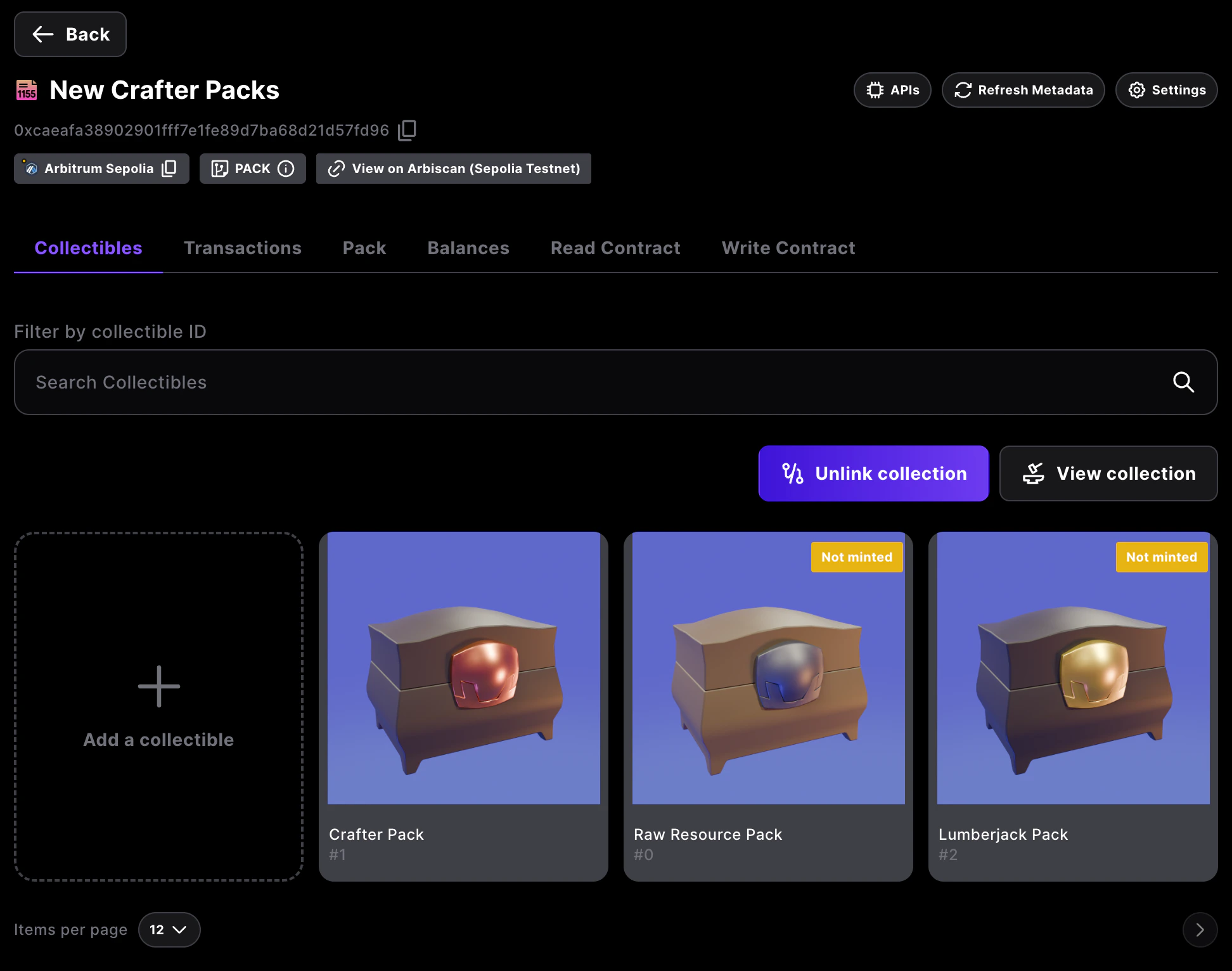
From your project dashboard, select the PACK contract you want to configure, then open the `Pack` tab to manage its contents. Confirm you are on the correct network and linked collection before editing.
 ## Step 2: Choose or add a pack to edit
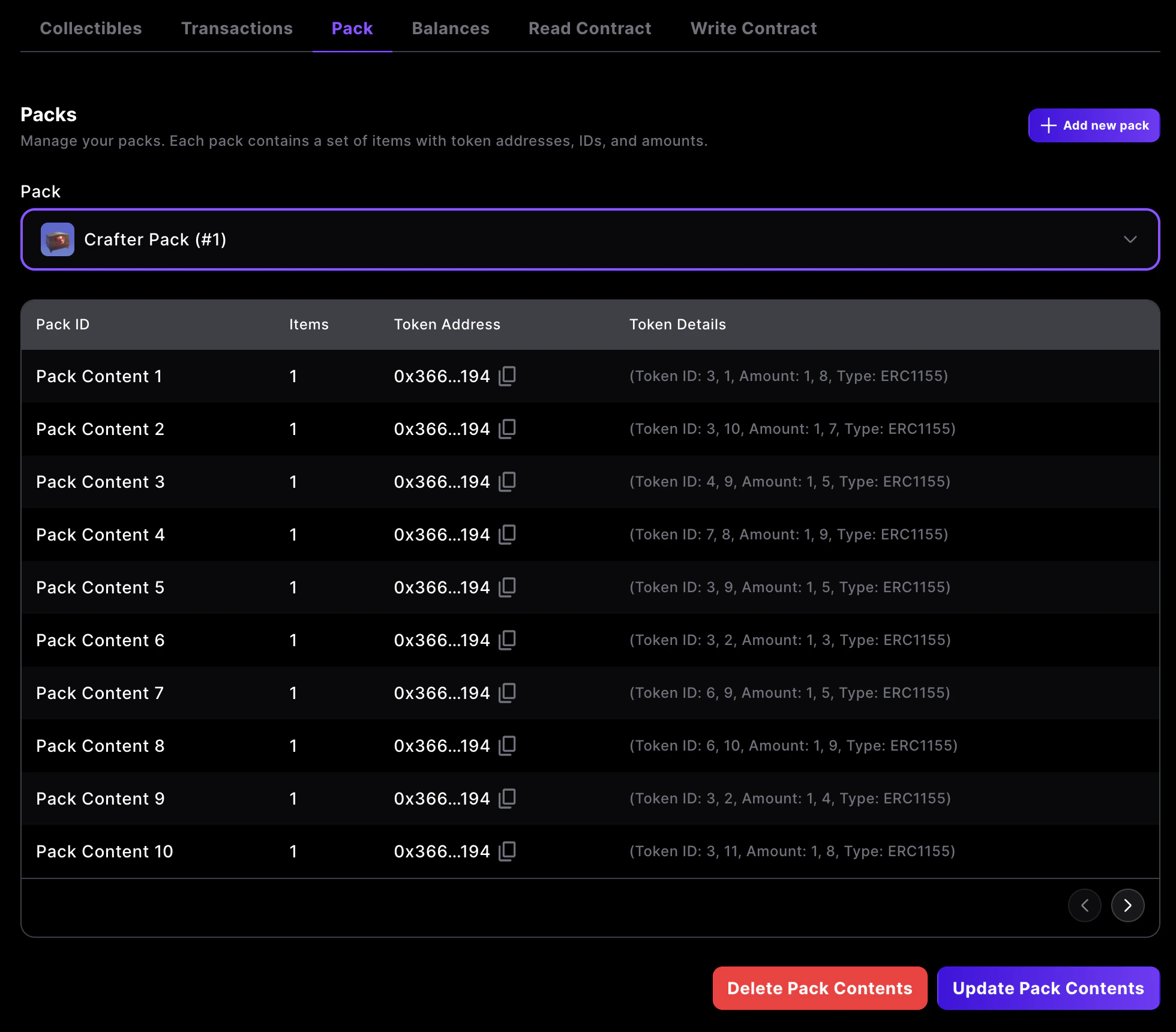
Use the pack selector to pick the pack you want to update, or click `Add new pack` to create another pack entry. The table lists each pack's underlying token address, type, IDs, and amounts that will be included when a pack is opened.
## Step 2: Choose or add a pack to edit
Use the pack selector to pick the pack you want to update, or click `Add new pack` to create another pack entry. The table lists each pack's underlying token address, type, IDs, and amounts that will be included when a pack is opened.
 ## Step 3: Upload pack contents via CSV
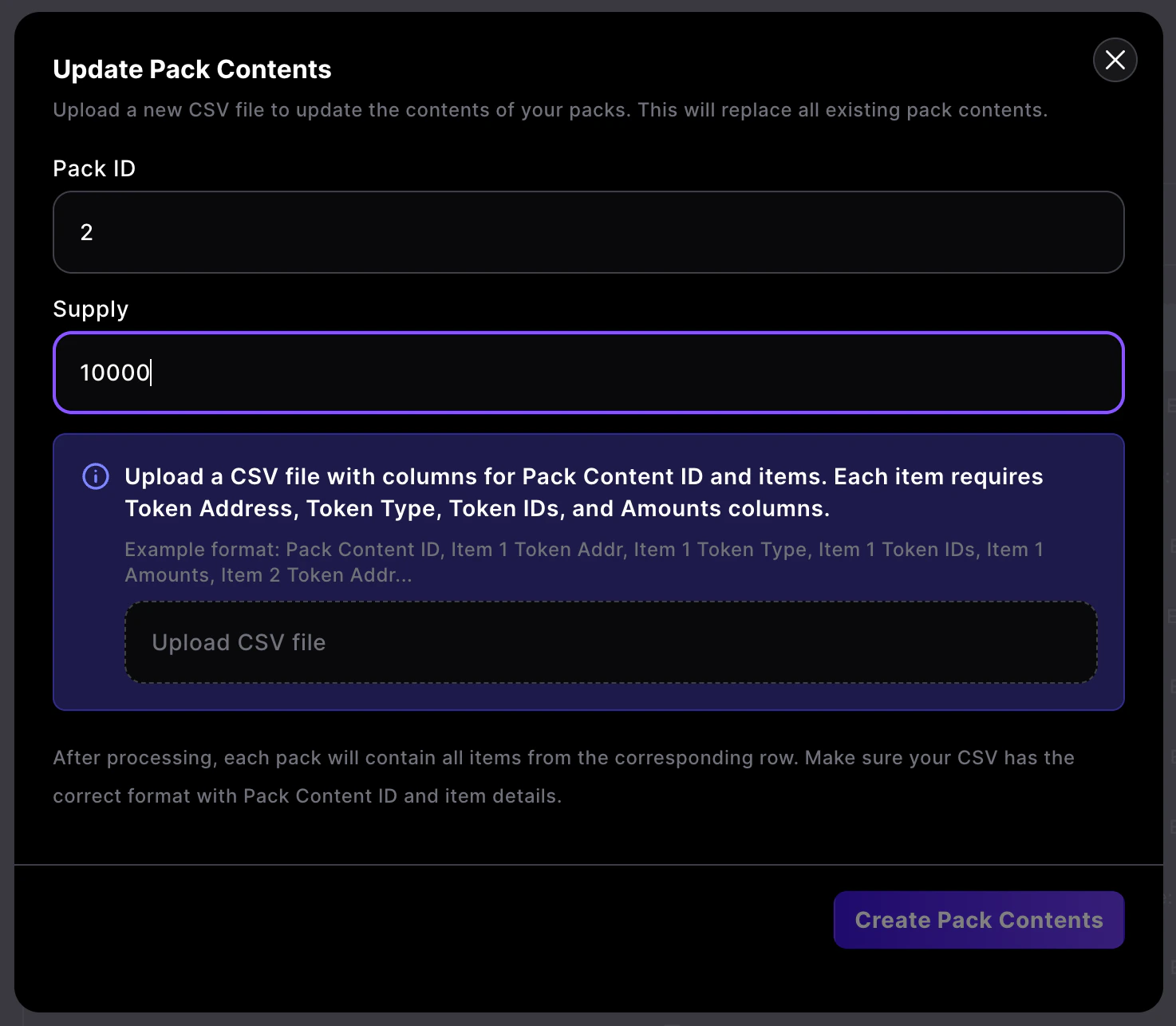
Click `Add New Pack` or `Update Pack Contents` to open the CSV uploader. Enter the `Pack ID` you want to modify, set the `Supply` for how many packs can be opened, and upload a CSV with one row per pack content.
Each row must include:
* `Pack Content ID`
* For each item: `Token Address`, `Token Type` (1155/721), `Token IDs`, and `Amounts`
e.g.
```
Pack Content ID, Item 1 Token Addr, Item 1 Token Type, Item 1 Token IDs, Item 1 Amounts, Item 2 Token Addr, Item 2 Token Type, Item 2 Token IDs, Item 2 Amounts
1,0x3a6a8f4091b705fe1241c47e2532d45a6dff5a85,721,"1200","1",0xa558419686308ce836c36a5c44eeeb4b0916ca7b,1155,"5,6","7,3"
2,0x3a6a8f4091b705fe1241c47e2532d45a6dff5a85,721,"1201","1",0xa558419686308ce836c36a5c44eeeb4b0916ca7b,1155,"9,10","7,9"
3,0x3a6a8f4091b705fe1241c47e2532d45a6dff5a85,721,"1202","1",0xa558419686308ce836c36a5c44eeeb4b0916ca7b,1155,"7,8","4,8"
4,0x3a6a8f4091b705fe1241c47e2532d45a6dff5a85,721,"1203","1",0xa558419686308ce836c36a5c44eeeb4b0916ca7b,1155,"9","7"
5,0x3a6a8f4091b705fe1241c47e2532d45a6dff5a85,721,"1204","1",0xa558419686308ce836c36a5c44eeeb4b0916ca7b,1155,"9,10","5,4"
```
## Step 3: Upload pack contents via CSV
Click `Add New Pack` or `Update Pack Contents` to open the CSV uploader. Enter the `Pack ID` you want to modify, set the `Supply` for how many packs can be opened, and upload a CSV with one row per pack content.
Each row must include:
* `Pack Content ID`
* For each item: `Token Address`, `Token Type` (1155/721), `Token IDs`, and `Amounts`
e.g.
```
Pack Content ID, Item 1 Token Addr, Item 1 Token Type, Item 1 Token IDs, Item 1 Amounts, Item 2 Token Addr, Item 2 Token Type, Item 2 Token IDs, Item 2 Amounts
1,0x3a6a8f4091b705fe1241c47e2532d45a6dff5a85,721,"1200","1",0xa558419686308ce836c36a5c44eeeb4b0916ca7b,1155,"5,6","7,3"
2,0x3a6a8f4091b705fe1241c47e2532d45a6dff5a85,721,"1201","1",0xa558419686308ce836c36a5c44eeeb4b0916ca7b,1155,"9,10","7,9"
3,0x3a6a8f4091b705fe1241c47e2532d45a6dff5a85,721,"1202","1",0xa558419686308ce836c36a5c44eeeb4b0916ca7b,1155,"7,8","4,8"
4,0x3a6a8f4091b705fe1241c47e2532d45a6dff5a85,721,"1203","1",0xa558419686308ce836c36a5c44eeeb4b0916ca7b,1155,"9","7"
5,0x3a6a8f4091b705fe1241c47e2532d45a6dff5a85,721,"1204","1",0xa558419686308ce836c36a5c44eeeb4b0916ca7b,1155,"9,10","5,4"
```
 The CSV replaces all existing contents for the selected Pack ID, and resets pack distribution tracking.
If you have already distributed packs for a specific ID, we recommend you do not change the CSV, as this resets which packs have been opened.
If a 721 item was already distributed in a previous pack, and it is in a new pack CSV, it will fail to mint when a user opens that pack.
## Step 4: Give the pack contract a Minter role on your item collection
For packs to mint items when opened, grant the ERC1155Pack contract address the `Minter` role on the ERC1155 collection you're using for pack contents. Open that item contract’s `Settings > Permissions`, add the pack contract address, and assign `Minter`, then sign the transaction.
## Step 5: Review and publish
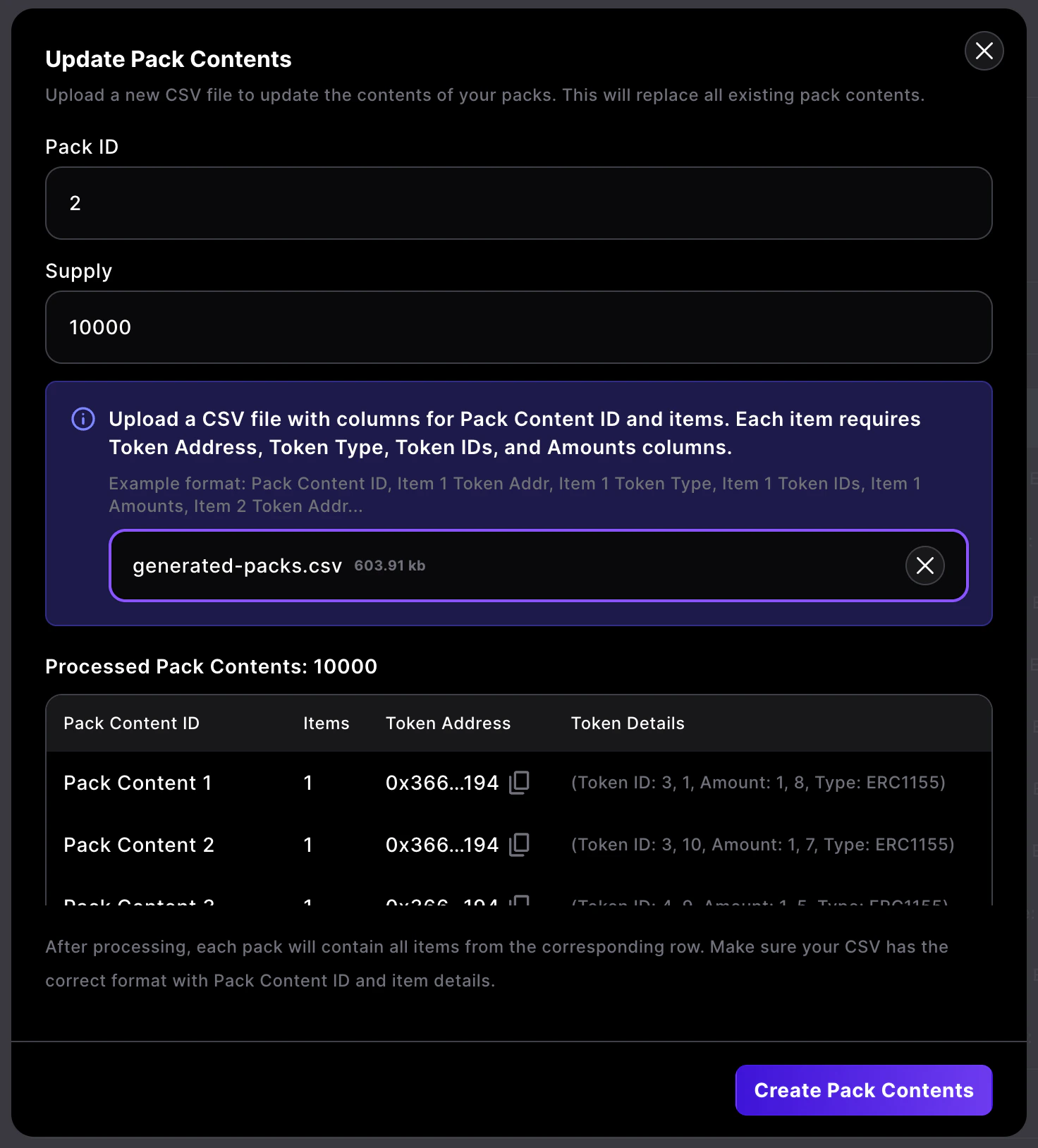
After the CSV is processed you will see a preview of the parsed Pack Content rows. Verify the token addresses, IDs, amounts, and totals, then click `Create Pack Contents` to save. Your pack is now ready to be opened by players.
The CSV replaces all existing contents for the selected Pack ID, and resets pack distribution tracking.
If you have already distributed packs for a specific ID, we recommend you do not change the CSV, as this resets which packs have been opened.
If a 721 item was already distributed in a previous pack, and it is in a new pack CSV, it will fail to mint when a user opens that pack.
## Step 4: Give the pack contract a Minter role on your item collection
For packs to mint items when opened, grant the ERC1155Pack contract address the `Minter` role on the ERC1155 collection you're using for pack contents. Open that item contract’s `Settings > Permissions`, add the pack contract address, and assign `Minter`, then sign the transaction.
## Step 5: Review and publish
After the CSV is processed you will see a preview of the parsed Pack Content rows. Verify the token addresses, IDs, amounts, and totals, then click `Create Pack Contents` to save. Your pack is now ready to be opened by players.
 Looking for a frontend to open packs? Check out our react boilerplate at [https://github.com/0xsequence-demos/pack-opening-boilerplate/](https://github.com/0xsequence-demos/pack-opening-boilerplate/).
## How ERC1155Pack works
Pack contents are managed by addresses with `PACK_ADMIN_ROLE` using `setPacksContent(bytes32 _merkleRoot, uint256 _supply, uint256 packId)`. The merkle root encodes every possible pack content, and `supply` defines how many packs can be opened for that ID. Builder handles the root creation from your CSV so you can focus on content.
Flow (on-chain):
* User calls `commit(packId)` to burn their pack and create a commitment.
* After at least one block, anyone can call `reveal(user, packContent, proof, packId)` with a merkle proof for the selected content; the contract verifies and mints the items. The Sequence API will do this automatically.
* If reveal is not called before the commitment block hash expires (30 minutes), `refundPack(user, packId)` returns the pack.
Randomization:
* Commitment records `block.number + 1` for randomness.
* Reveal derives `randomSeed = keccak256(abi.encode(blockHash, user))`.
* The contract picks `randomSeed % remainingSupply[packId]`, using a Fisher–Yates-style `_availableIndices` map so each content can only be revealed once and stays uniformly random.
* The merkle leaf is `keccak256(abi.encode(revealIdx, packContent))`, matched by the supplied proof.
Validators or miners controlling sequential blocks could bias block hashes. Allowing anyone to call `reveal` helps ensure committed packs are revealed before block hashes expire.
Looking for a frontend to open packs? Check out our react boilerplate at [https://github.com/0xsequence-demos/pack-opening-boilerplate/](https://github.com/0xsequence-demos/pack-opening-boilerplate/).
## How ERC1155Pack works
Pack contents are managed by addresses with `PACK_ADMIN_ROLE` using `setPacksContent(bytes32 _merkleRoot, uint256 _supply, uint256 packId)`. The merkle root encodes every possible pack content, and `supply` defines how many packs can be opened for that ID. Builder handles the root creation from your CSV so you can focus on content.
Flow (on-chain):
* User calls `commit(packId)` to burn their pack and create a commitment.
* After at least one block, anyone can call `reveal(user, packContent, proof, packId)` with a merkle proof for the selected content; the contract verifies and mints the items. The Sequence API will do this automatically.
* If reveal is not called before the commitment block hash expires (30 minutes), `refundPack(user, packId)` returns the pack.
Randomization:
* Commitment records `block.number + 1` for randomness.
* Reveal derives `randomSeed = keccak256(abi.encode(blockHash, user))`.
* The contract picks `randomSeed % remainingSupply[packId]`, using a Fisher–Yates-style `_availableIndices` map so each content can only be revealed once and stays uniformly random.
* The merkle leaf is `keccak256(abi.encode(revealIdx, packContent))`, matched by the supplied proof.
Validators or miners controlling sequential blocks could bias block hashes. Allowing anyone to call `reveal` helps ensure committed packs are revealed before block hashes expire.